Logo

Submit a request Sign in
Voltax CMS & Sites Help Center
  1. Voltax CMS & Sites Help Center
  2. CMS & Craft
  3. FAQ's
  4. Schedule

How do I reschedule an article via the Scheduler?

March 17, 2026 11:18
  1. In the “Schedule” dashboard, choose the desired article you’d like to reschedule
  2. Click the “Reschedule” button of the article
  3. Choose a new time and/or date 
  4. Reschedule the article or publish it right away
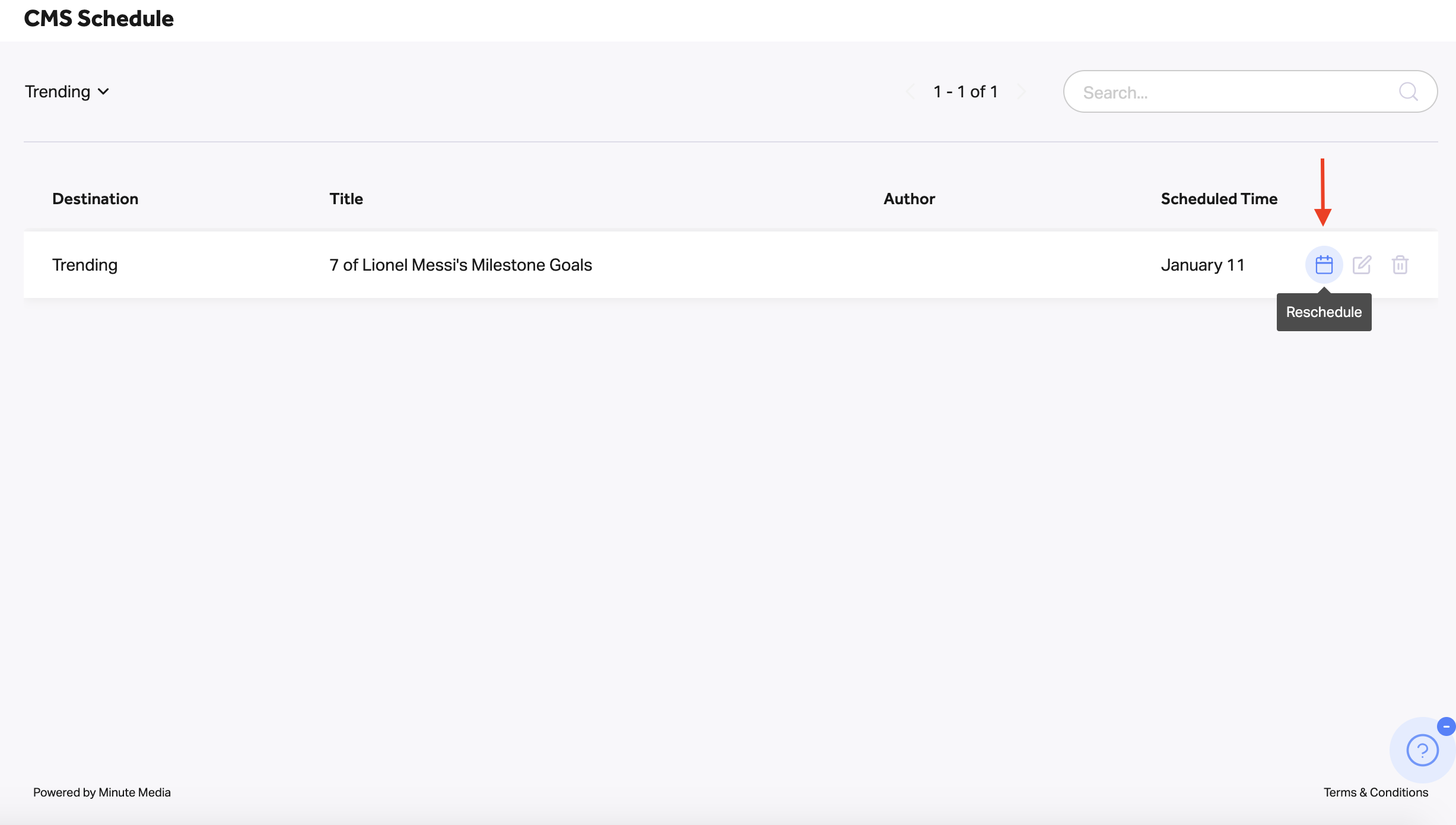
    How_do_I_reschedule_an_article_via_the_Scheduler_.png

Articles in this section

  • What can I do in the Schedule dashboard?
  • I scheduled an article via the Publisher, but why can’t I see it in the Schedule dashboard?
  • How do I reschedule an article via the Scheduler?
  • When I reschedule an article, which date will appear on the website?
  • What happens when you remove an article from the Schedule dashboard?
  • I removed an article from the Schedule dashboard, so why can’t I find it in the Publisher dashboard?

Can't find what you're looking for?

Contact us at: Helpdesk@minutemedia.com

Submit a request

© Voltax CMS & Sites Help Center

Check out Voltax Status Page

Powered by Zendesk